import openpyxl
from openpyxl.styles import Alignment
from openpyxl.styles import Font

def unmerge_cells_from_file(my_file):
    """
    For a given file, opens each sheet and unmerges the cells.
    Aligns to left and highlights in red the unmerged cells.
    Saves a new excel file with the _UNMERGED suffix.
    """
    LEFT_ALIGN = Alignment(horizontal='left')
    RED_FONT = Font(color="FF0000")
    # data_only is required to evaluate the cells and store the correct value
    wb = openpyxl.load_workbook(my_file, data_only=True)
    for sheet in wb.sheetnames:
        ws = wb[sheet]
        # It's weird, but the  for loop do not capture all the groups
        # So we iterate with a while loop to reduce all merged cells
        while len(ws.merged_cells.ranges) > 0:
            group = ws.merged_cells.ranges[0]
            min_col, min_row, max_col, max_row = group.bounds
            top_left_cell_value = ws.cell(row=min_row, column=min_col).value
            # unmerge before asigning a the value
            ws.unmerge_cells(str(group))
            for irow in range(min_row, max_row+1):
                for jcol in range(min_col, max_col+1):
                    cell = ws.cell(row=irow, column=jcol)
                    cell.value = top_left_cell_value
                    cell.alignment = LEFT_ALIGN
                    cell.font = RED_FONT

    output_file = my_file.replace("input", "tmp").replace(".xlsx", " UNMERGED.xlsx")
    wb.save(output_file)
returnUnmerging excel cells
python
excel
código
Cuando pandas se quedó corto
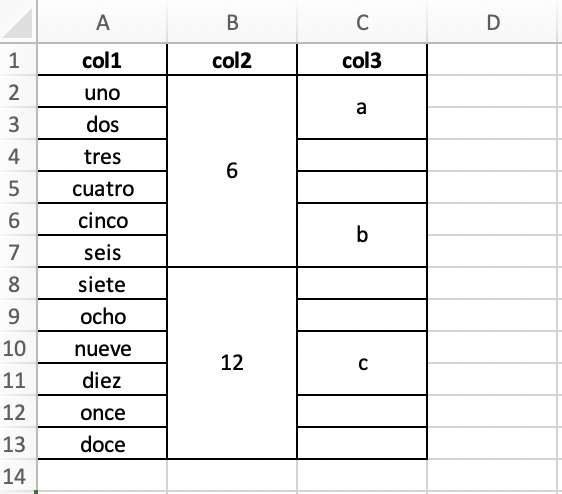
Recently I needed to process a large number of excel files that had many merged cells. Something like what I show in the image:
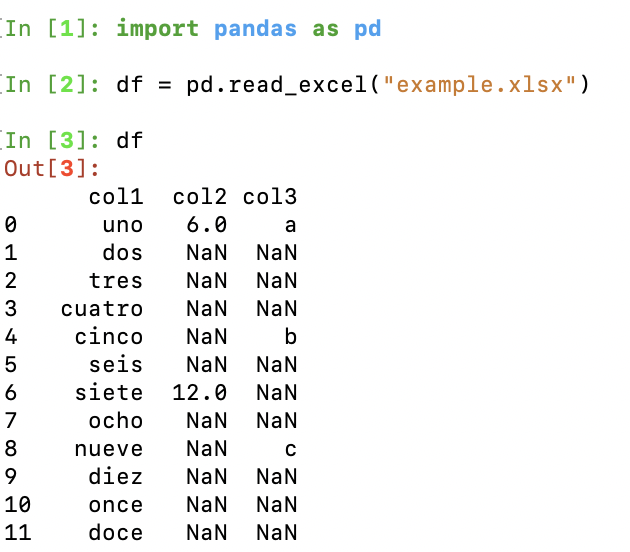
I thought the good old reliable pandas library would be enough, but no. When opening the file with pandas, the cell’s value is assigned only to the first one:
Naively I tried filling with fillna and replacing the NaNs, but the result wasn’t what I wanted:
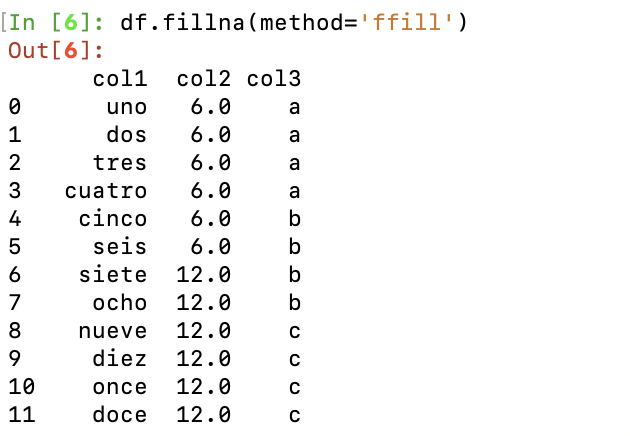
None of the methods for filling the adjacent cells (fillna with options ‘backfill’, ‘bfill’, ‘pad’, ‘ffill’, None) works, because there are unmerged cells that should remain without data.
What to do then? After a lot of googling, I found the right solution on stackoverflow. The openpyxl library is incredibly flexible and allows cell-by-cell manipulation.
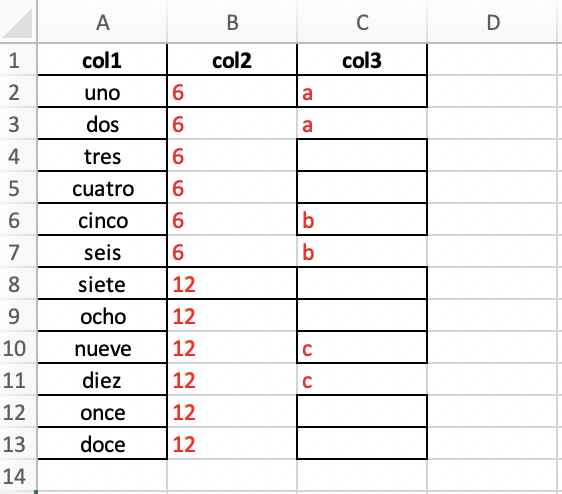
The following function, which is an improved version of the one proposed on stackoverflow, will remove the merged cells by copying the corresponding values. It will do it for all the sheets of the file, and will highlight in red the cells that were modified:
The resulting excel is the following:
From that point on, it’s possible to work with pandas without problems.
Note: You have to use a recent version of pyopenxl, since the previous version throws an error.